
Everything OkBell does
Reminders remind. OkBell makes sure.


What OkBell is
OkBell is one app for anything that falls due. For you and your family it reminds you about papers, renewals, bills and dates early enough to act. For a class, gym, PG, small society or club it reminds payers about fees, keeps reminding until a due is paid, and builds a call list of who is left, while the money goes straight to the business.
Who it is for
- You and your family (the Personal space)
- Classes, gyms, PGs and hostels, small societies and clubs (the Business space)
- Payers and members, who need no app
Where it runs
| iPhone and Android The OkBell app | |
| app.okbell.app The web app, in any browser | |
| A link Payers, members and the people you remind open a link; they need no app |
 Thaja · Newtact
What is inside
Thaja · NewtactGetting started and your account
One sign-in opens everything: your own reminders, your family space and your business.
Thaja · NewtactSign in with an email code
Type your email, get a 6-digit code and you are in. There is no password to remember, and on the web you can also sign in with a passkey.
- No password to forget or leak
- The same account on the web, iPhone and Android
- A passkey on the web for quick sign-in
One app, two spaces
OkBell has a Personal space for you and your family and a Business space for collecting fees and dues. One account can hold both, and the first screen after sign-in lists every space you belong to.
- Home reminders and business dues under one sign-in
- Your personal data is kept apart from any business
- Start free in either space
Thaja · NewtactWorks without a signal
On the phone, every tap such as Done, Later or Mark paid is saved at once and sent when there is a signal. A list shows what is still waiting and, if a tap was refused, why.
- Keep working in a basement or on the road
- Nothing is dropped if the network fails
- A clear list of what is still waiting to sync
Terms and privacy, in your language
The first time you use OkBell, and when the Terms of Use or Privacy Policy change, a card asks you to read and agree. Nothing is locked while you decide.
- You always know what you agreed to
- Read each document in your language first
- No lock-outs while you decide
Thaja · NewtactYour account, language and theme
Account is where you pick your language, turn on dark mode, sign out and delete your account. On the web you can also download what you added to a space as a file.
- OkBell starts in light mode; dark mode is one switch away and it stays
- Use OkBell in the language you read best
- What you added is yours to download
- Deleting your account is one clear step
Thaja · NewtactDue: reminders for you and your family
Anything with a date: papers, renewals, bills, birthdays and deadlines, reminded early enough to act.
Thaja · NewtactWhat is due
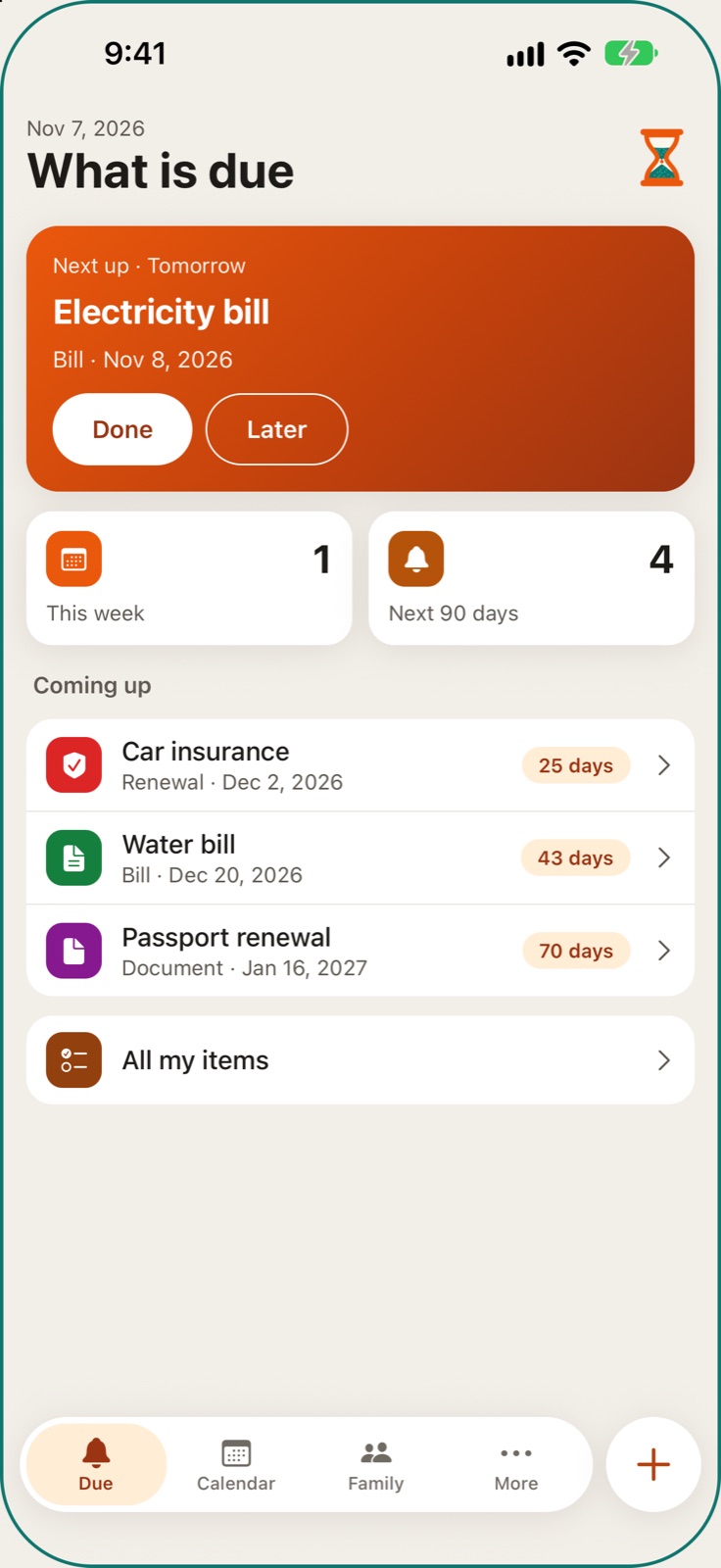
The first screen of your Personal space shows only what falls due soon, as cards with Done and Later. You choose how far ahead it looks, from 3 days to everything; the rest waits under Coming up, so the screen stays calm.
- See at a glance what needs you soon, and nothing else
- Choose how far ahead to look; your reminders still come as set
- Done or Later in one tap, even offline on the phone
- Add something in seconds with the + button
Thaja · NewtactAdd anything with a date
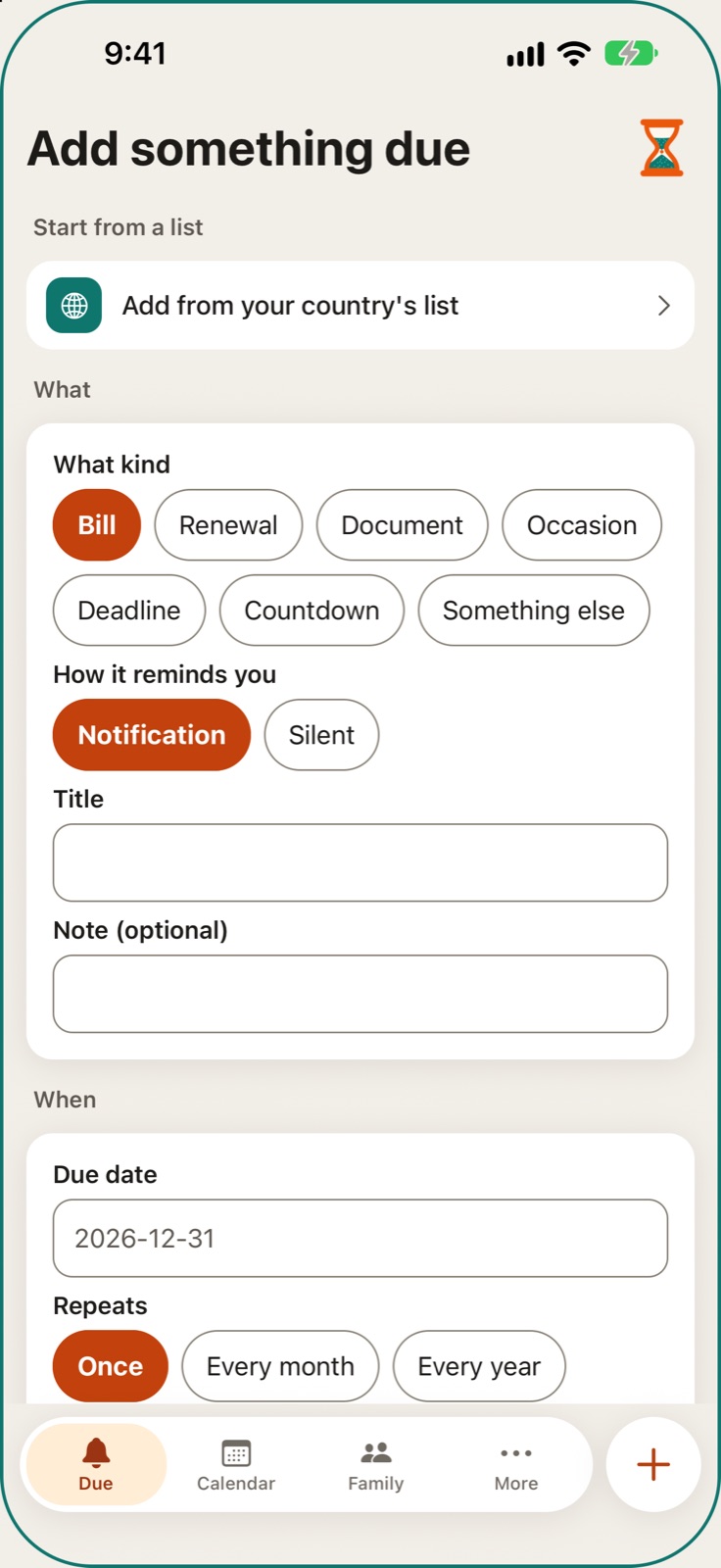
Add anything with a date: pick a kind such as Bill, Renewal, Document, Occasion or Deadline, then give it a title, a date and a repeat. OkBell reminds you some days before, on the day, and again the next day if it is still not marked done.
- Add a reminder in under a minute
- Each kind comes with sensible "days before" already set
- A second nudge if you missed the day
- Reminders come by app notification and email
 Thaja · Newtact
All my items
Every item you added, in one list. Open one to change it, put it away for a while and bring it back later, renew a document with its new expiry date, or delete it.
- Renew a paper and its reminders start again
- Pause an item without losing it
- Nothing is deleted unless you say so
Thaja · NewtactYour country's list of papers
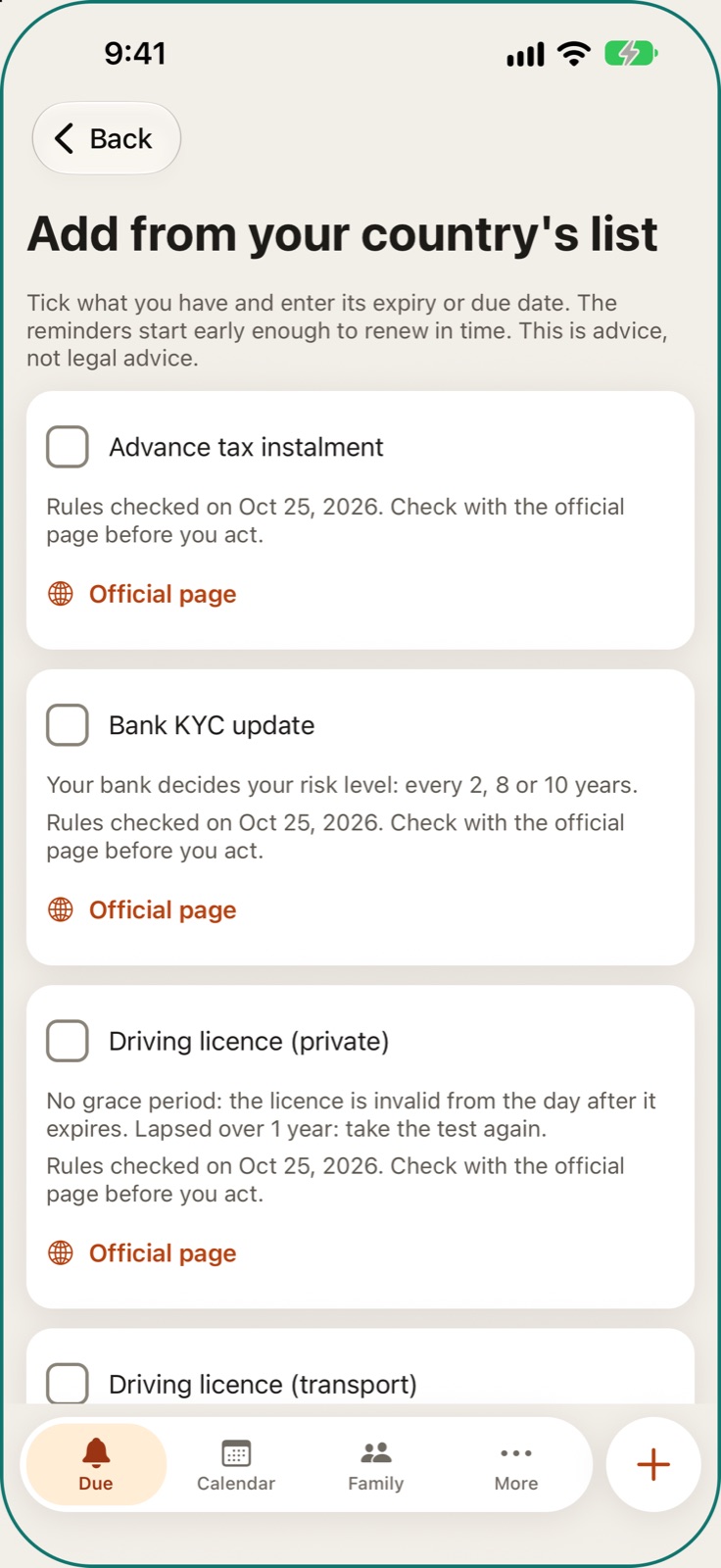
Where OkBell has checked one, a ready list of papers and renewals for your country, such as a passport or a driving licence. Tick what you have, type its date, and OkBell plans the reminders early enough to renew in time.
- Renewal rules already looked up for you
- Each rule shows the date it was checked and its official page
- Advice to help you plan, not legal advice
 Thaja · Newtact
Calendar feed
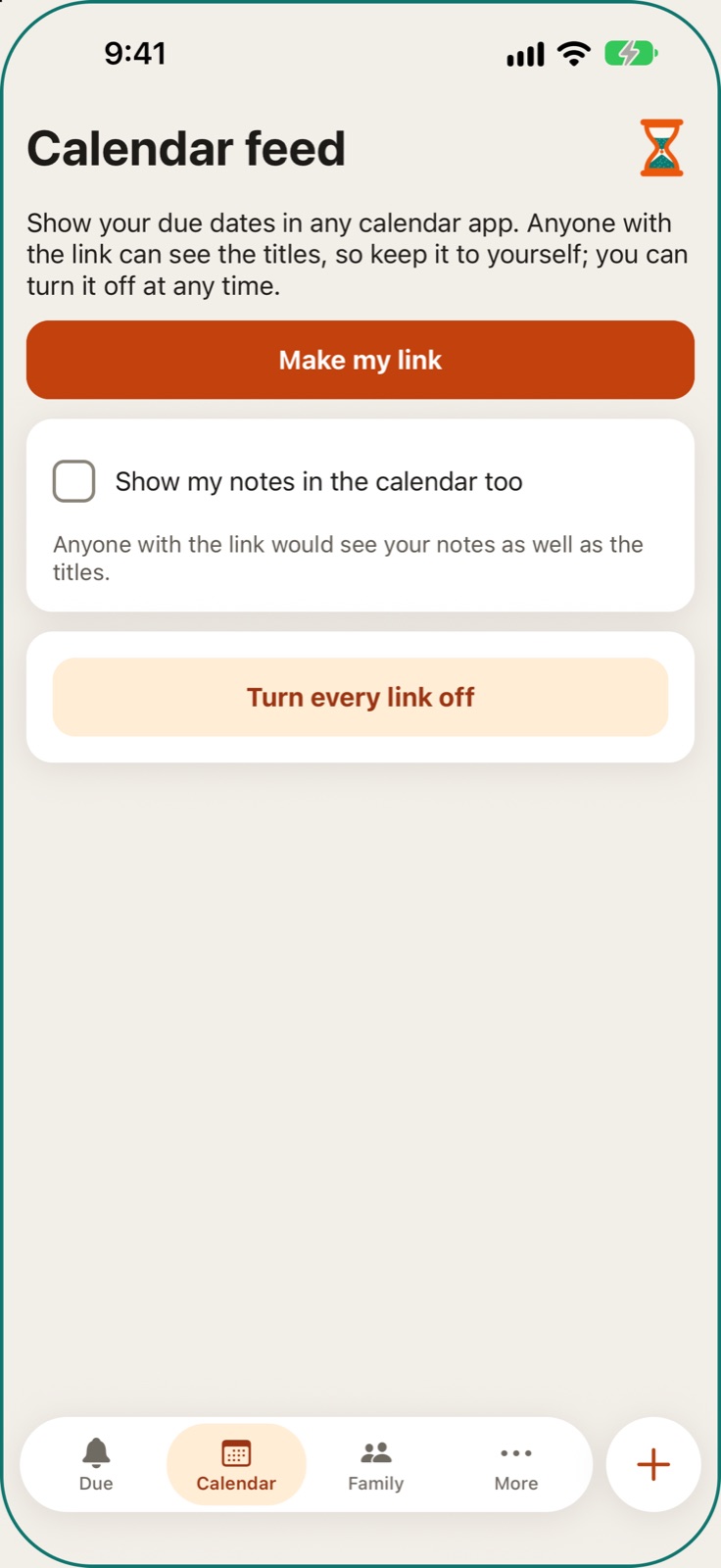
Make a private link that shows your due dates in Apple Calendar, Google Calendar or Outlook. Notes stay out unless you tick them in, and one button turns every link off.
- Your due dates next to your other plans
- Works with the calendar app you already use
- Turn every link off at once if a link gets out
 Thaja · Newtact
Bring dates in from your calendar
Paste the link of a calendar you already keep, such as Google, Outlook or Apple. OkBell lists the coming events it finds, and only the ones you tick become reminders.
- No typing your dates a second time
- Nothing is added unless you tick it
- Remove the link and OkBell stops reading at once
Thaja · NewtactA family space
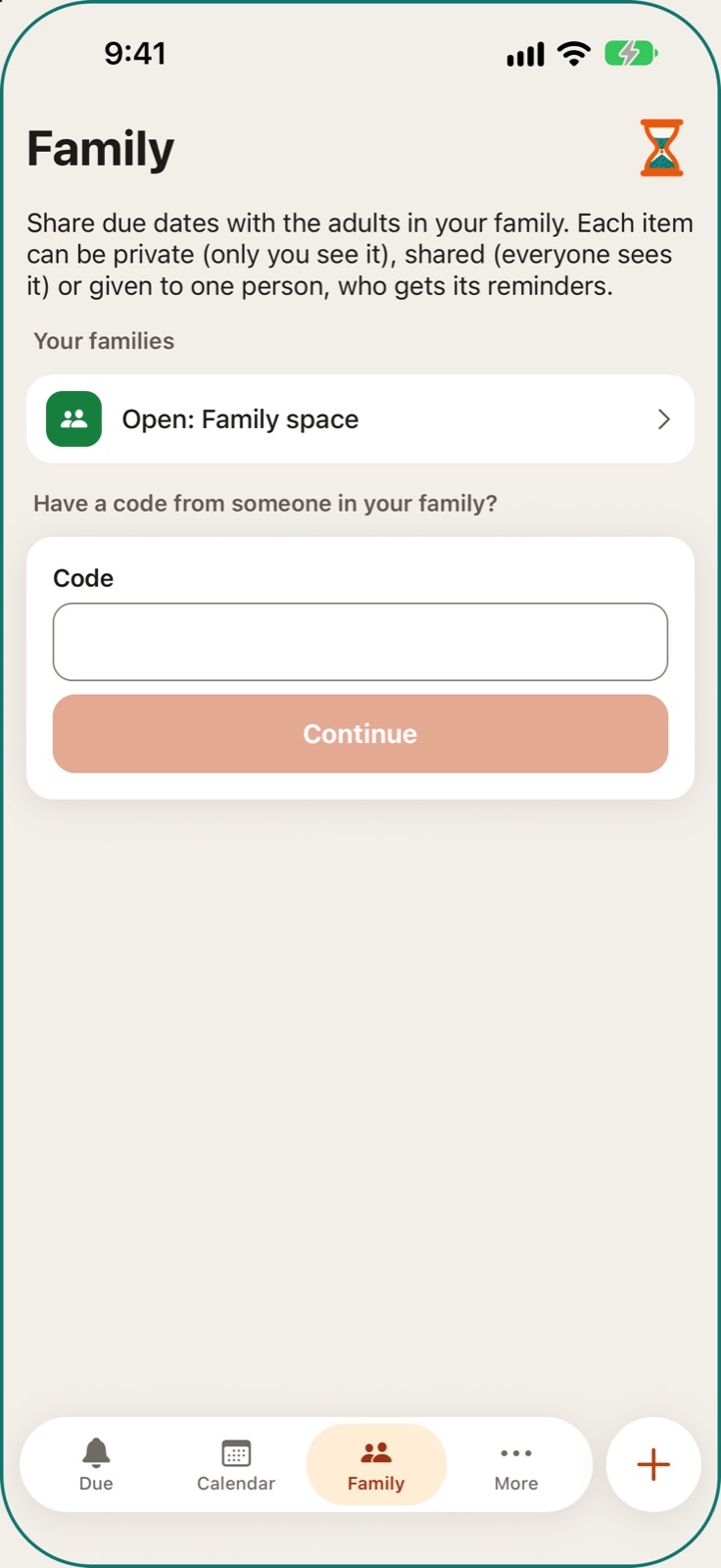
A shared space next to your own for the adults in your family. You invite someone with a code you send yourself, and each item can be private, shared with everyone, or given to one person who then gets its reminders.
- The whole family sees shared due dates
- Private items stay private
- A family calendar shows who has what
 Thaja · Newtact
More for Personal
More ways to be reminded: alarms, lists, templates, places and a private work diary.
Thaja · NewtactLists and checklists
Shopping, packing and to-fix lists in your Personal space. Tick lines as you go, give any line a date and a reminder, and share a list with your family space so everyone can add and tick.
- One shared shopping list for the family
- Any line can become a reminder
- Each list shows how many lines are left
Ready-made templates
Ready-made sets of reminders by category: papers, home, bills, parents and more. Open a card, see what it adds, give each reminder a date and add them.
- Start with the right reminders in a minute
- Asks only for dates, never for ID numbers
- Shows the sets offered in your country
Thaja · NewtactJob offer check
Before you accept a job abroad, go through plain questions and tick them off. They come with the official pages for your home country and the country of work.
- Spot a risky offer before you travel
- Official pages, not rumours
- General information, not legal advice
Work and money diary
A private diary for people working away from home: days worked, off or sick, pay days, money sent home and coming costs. It works with no network, is backed up unless you turn that off, and opens only with your Private code or Face ID.
- Your own record of days worked and pay received
- "Did your pay arrive?" asks on pay day
- A dated PDF record for when you need to show it
Thaja · NewtactRemind someone else
Have OkBell remind someone else, such as a parent whose paper is due. You send the invite from your own WhatsApp or SMS, and OkBell messages nobody until that person says yes themselves.
- Help a parent or relative remember their dates
- They can stop or report with one link
- OkBell never messages anyone first and never sends them offers
Saved places
Save places such as a shop, the office or a parent's home, and link reminders to them. On the phone, "Nearby now" sorts your places by distance when you ask.
- Link a reminder to a place with "Remind me here"
- Your position is read on your phone, and only when you ask
- Places are private and open with your Private code
Thaja · NewtactReminders that ring like an alarm
A reminder can ring like an alarm clock on your phone. The alarm screen shows only that reminder, with its title and your notes, and Done, Later and Skip.
- Hard to miss a medicine or a deadline
- Later lets you pick 5, 10 or 15 minutes, an hour or tomorrow
- Answering on one phone closes it on your others
Hijri dates
Repeat an occasion every year by the Hijri date, so it falls on the right day each year. It is part of the paid Personal plans.
- Occasions that follow the Hijri calendar
- No working out the date again each year
Thaja · NewtactMore ways to repeat
Repeat a reminder every day, every few days, weeks or months, on chosen weekdays or several times a day. A repeat can also end on a date or after a number of times.
- Fits medicines, weekly chores and odd schedules
- End a repeat on a date or after a number of times
- Items you already made keep their dates
Done, Later and Skip on the notification
Done, Later and Skip sit on the reminder notification itself. You answer a reminder without opening the app.
- Answer straight from the notification
- Fewer taps for everyday reminders
Thaja · NewtactHome-screen widget
A widget for the phone's home screen that shows what is due today. It shows counts only, so no private title sits on your home screen unless you choose to show it.
- See today's dues without opening the app
- Counts only, unless you choose to show titles
- Never shows a place or where you are
Thaja · NewtactCare: check-ins for family
A daily "I'm OK" for a parent who lives alone, and check-ins on a journey. Not an emergency service.
Thaja · NewtactFamily care: a daily "I'm OK"
A parent who lives alone taps one big "I'm OK" button at the times you set. If a check-in is missed, OkBell reminds them first, then tells the family one person at a time until someone answers.
- Peace of mind for a parent who lives alone
- Each contact agrees before any alert reaches them
- Not an emergency service: the local emergency number is always on screen
Family care for contacts, by a link
A Family care contact is asked once and must agree before any alert reaches them. An alert opens a page that says what happened, with a button to call and answers such as "I'm checking", and no sign-in.
- Neighbours and relatives can help without installing anything
- Everyone sees who is checking
- A contact can stop the alerts at any time
Thaja · NewtactFamily care for keypad phones
A parent with a simple keypad phone can check in without an app. OkBell calls them each day, or they give a missed call, and that counts as their check-in.
- No smartphone needed for the parent
- Their own yes to the calls comes first
Trip check-ins
For a late cab, a night journey or a trek: tap "I'm OK" from the lock screen at the times you set. A missed check-in reminds you first, then tells the people you chose.
- Family knows you are fine without calling
- "Not OK" tells the people you chose
- You choose who is told, and they agree first
- Not an emergency service: the local emergency number is always shown
Thaja · NewtactGroup trips
Friends or family travelling together join one group trip. Any member can tap "Ask everyone" for a roll call, and each traveller chooses what their own family hears.
- One tap to ask the whole group
- A "Not OK" tells the group at once
- Each traveller chooses what their family hears
A shared trip plan
One list for a trip: places, food, stays, travel, to-dos and notes, day by day. On the phone each pinned item shows how far it is and opens in your maps app.
- The whole group works from one plan
- Add a pin from where you are, a search or a pasted map link
- Tick items off as they are done
Thaja · NewtactJust in case
If you go quiet for a long time, the right people get what you left for them. It is not a will and not a safe.
Thaja · NewtactJust in case
Write short messages and add photos for people you choose, and name someone you trust. If you stop checking in for a long time, and only after many reminders and a check with your trusted person, they are shared.
- Your family gets what they need to know
- Any check-in stops everything that is waiting
- OkBell staff can pause it but can never send it early
- Not a will, and not a way to pass on money or property
Just in case for the people you chose
The person you trust is asked how you are before anything is shared, on a page that needs no account. The people you left messages for open them in a browser with a reference, a code sent to their phone and, if you set one, a shared phrase.
- Nobody is contacted unless they agreed first
- No app or account needed to read a message
- It never asks for money or bank details
Thaja · NewtactCheck a Just in case message
Got a Just in case message? Type its reference at okbell.app/verify to see whether OkBell really sent it. The page never shows anyone's details, and it needs no account.
- Check a Just in case message before you trust it
- It never shows anyone's details
- No account needed
Just in case for your business
A business owner names one or two successors. If the owner stops checking in, after many reminders and a check with a person the owner chose, the successors get owner access to the business's OkBell account so work goes on.
- Reminders and collections do not stop with one person
- No money moves and no passwords are shared
- Not a legal transfer of the business
Thaja · NewtactCollect: fees and dues for a business
For classes, gyms, PGs, small societies and clubs: reminders that do not stop at one, and money that goes straight to the business.
Thaja · NewtactStart a business
Create a business with its name, kind, country and first branch, and start adding payers the same day. Each branch keeps its own payers, dues and receipt numbers.
- For classes, gyms, PGs, small societies and clubs
- A getting-started list on the Today screen
- Add your first payers the same day
Payers and a second contact
Add each payer once with a name, a reference such as a roll or flat number, and a phone or email. You can add a second contact, such as the other parent: they are asked on WhatsApp, where it is set up, and get nothing until they agree themselves.
- Find a payer by name or reference
- Phone numbers are masked on screen
- For a child, only a first name is kept
Thaja · NewtactMark paid
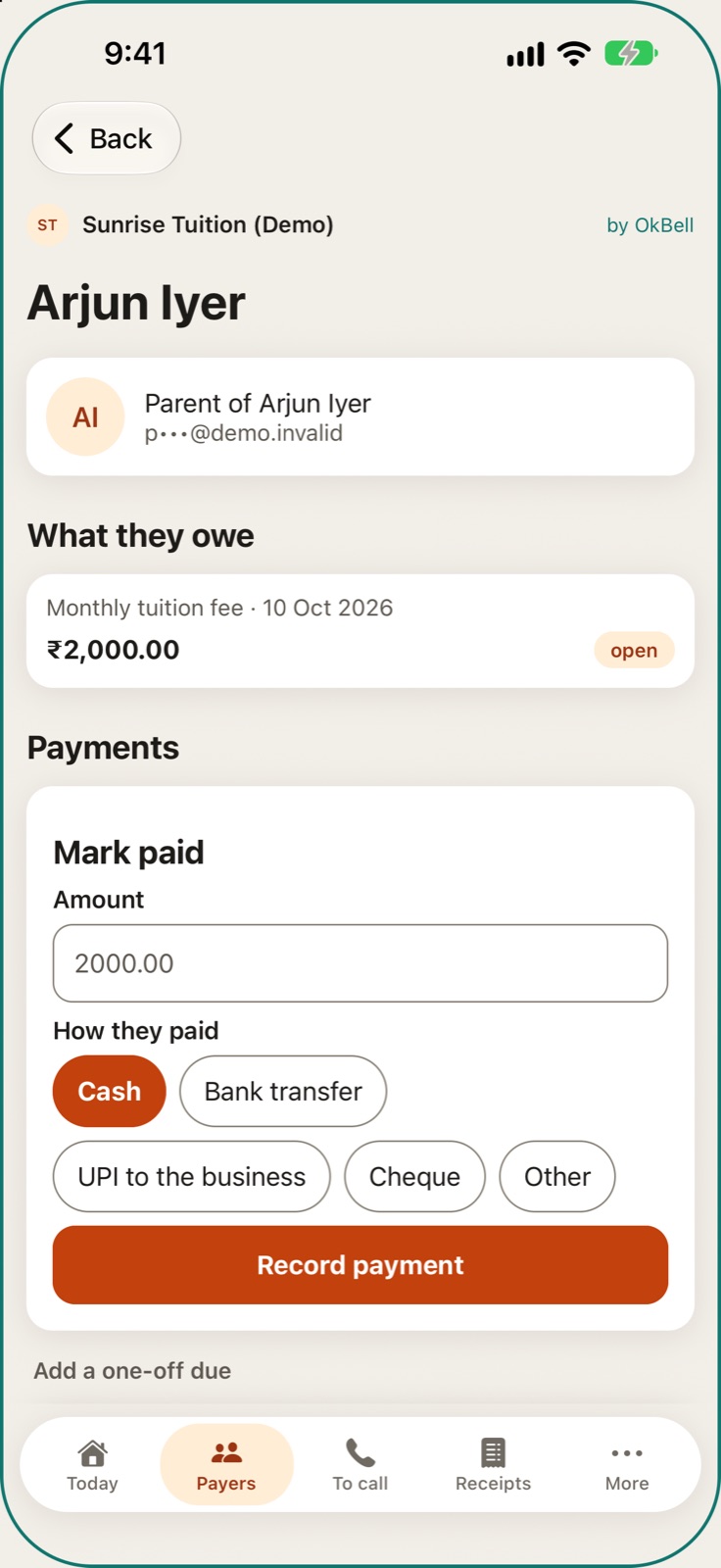
On a payer's page you see what they owe and what they paid, and record cash, a bank transfer, UPI to the business or a cheque with Mark paid. Reminders for that due stop and the payer gets a receipt.
- Works offline on the phone
- A receipt for cash too
- OkBell only records money you already received
 Thaja · Newtact
Dues and repeating fees
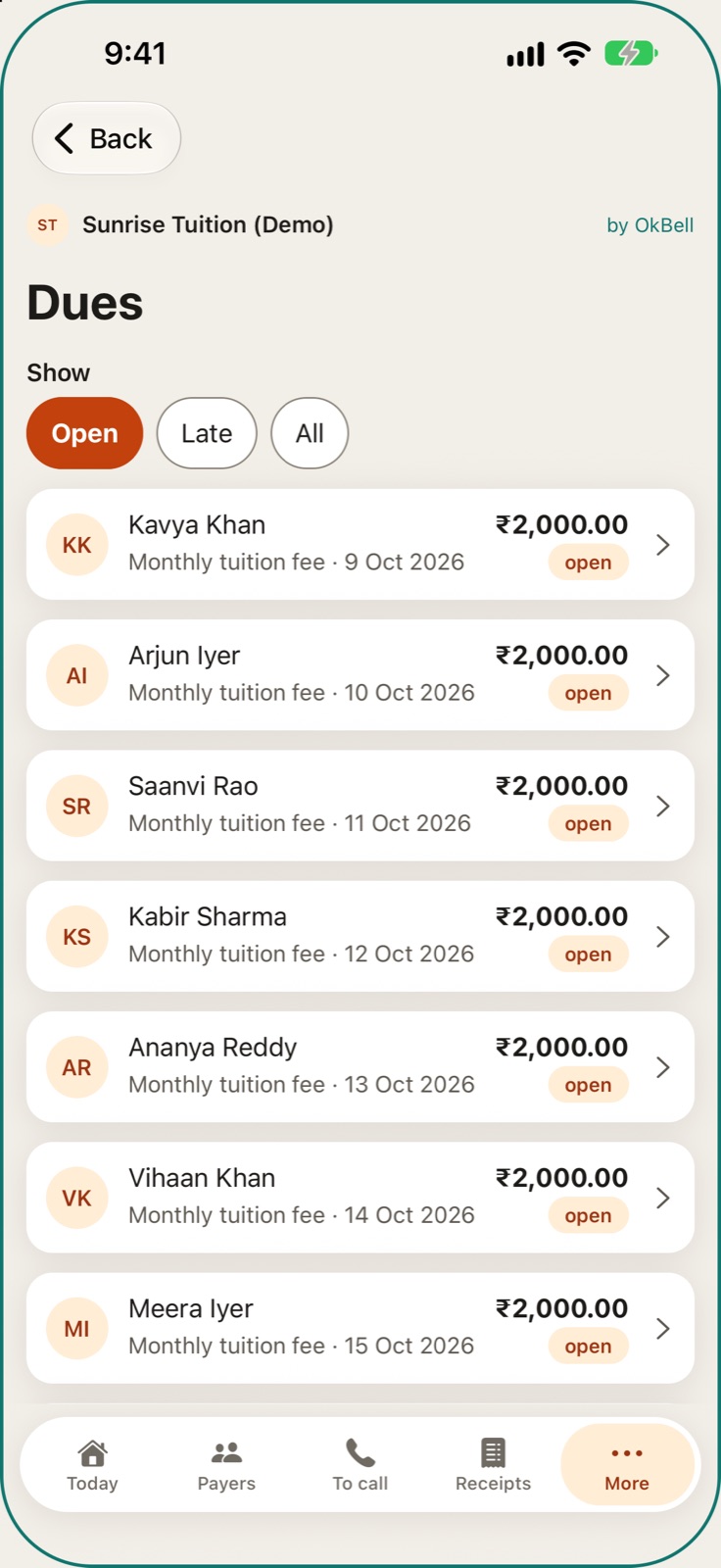
Give a payer a one-off due or a repeating fee: every week, month, 3 months, 6 months or year. OkBell makes each new due by itself and lists what is Open, Late or All.
- Set a monthly fee once
- See what is open and what is late
- Each due gets its own reminders
 Thaja · Newtact
Bills for many payers
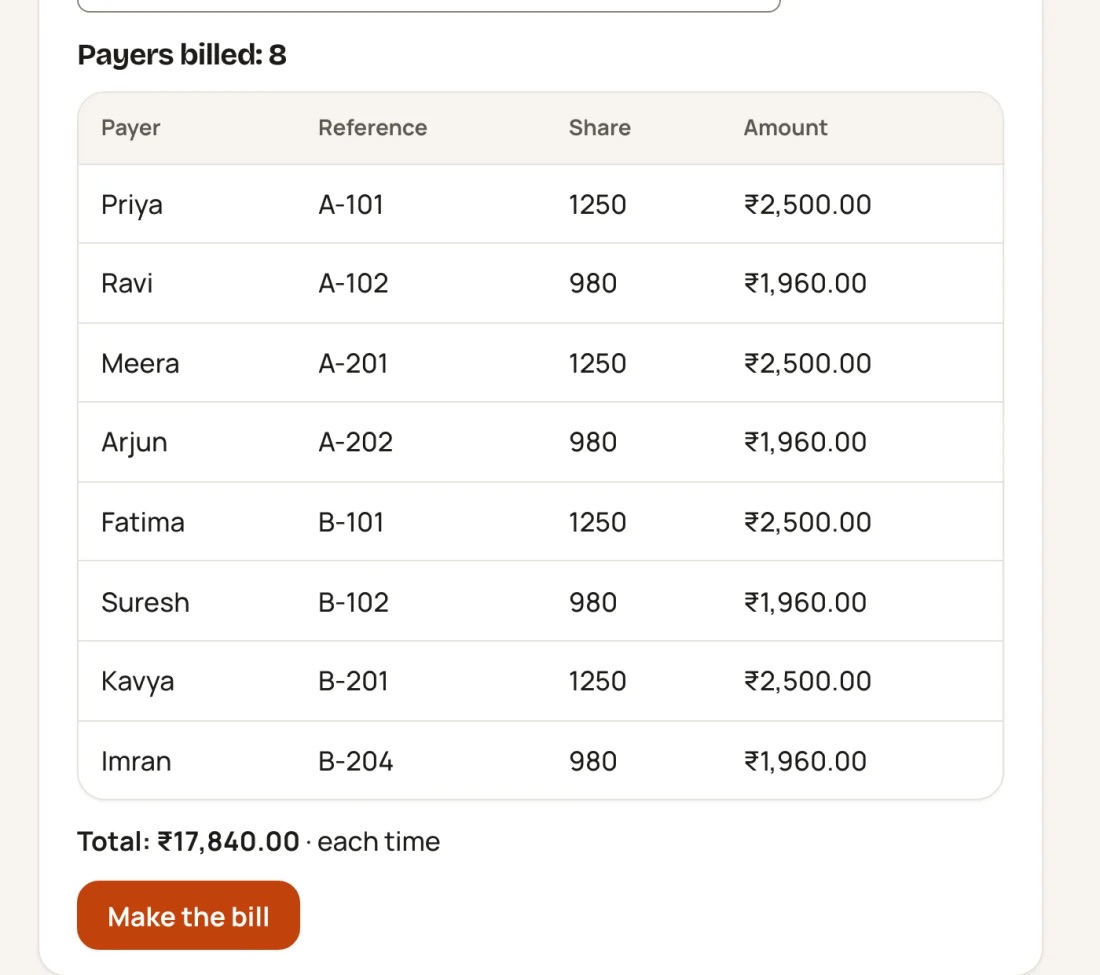
Charge every payer in a branch, or one group, in a single step: the same amount each, a total split equally, or a total split by share such as flat area. You see each payer's amount before you make the bill.
- One water bill split fairly across every flat
- The parts add up to the total exactly
- Ready-made bills for maintenance, a sinking fund and more
 Thaja · Newtact
Documents and renewals
Reminders for the business's own papers: a trade licence, insurance, staff visas, vehicle papers. Your team is reminded before the end date, and no payer is told.
- Never miss a licence or insurance renewal
- Choose who renews each paper
- "Renewed" records the new date and number
Funds
Name funds such as a sinking fund or a festival fund, point dues at them, and record money in and out. Each fund has a statement you can share with members.
- Members see where their money went
- Balances are what you recorded: OkBell holds no money
- A fund is archived, never deleted
Thaja · NewtactThe To call list
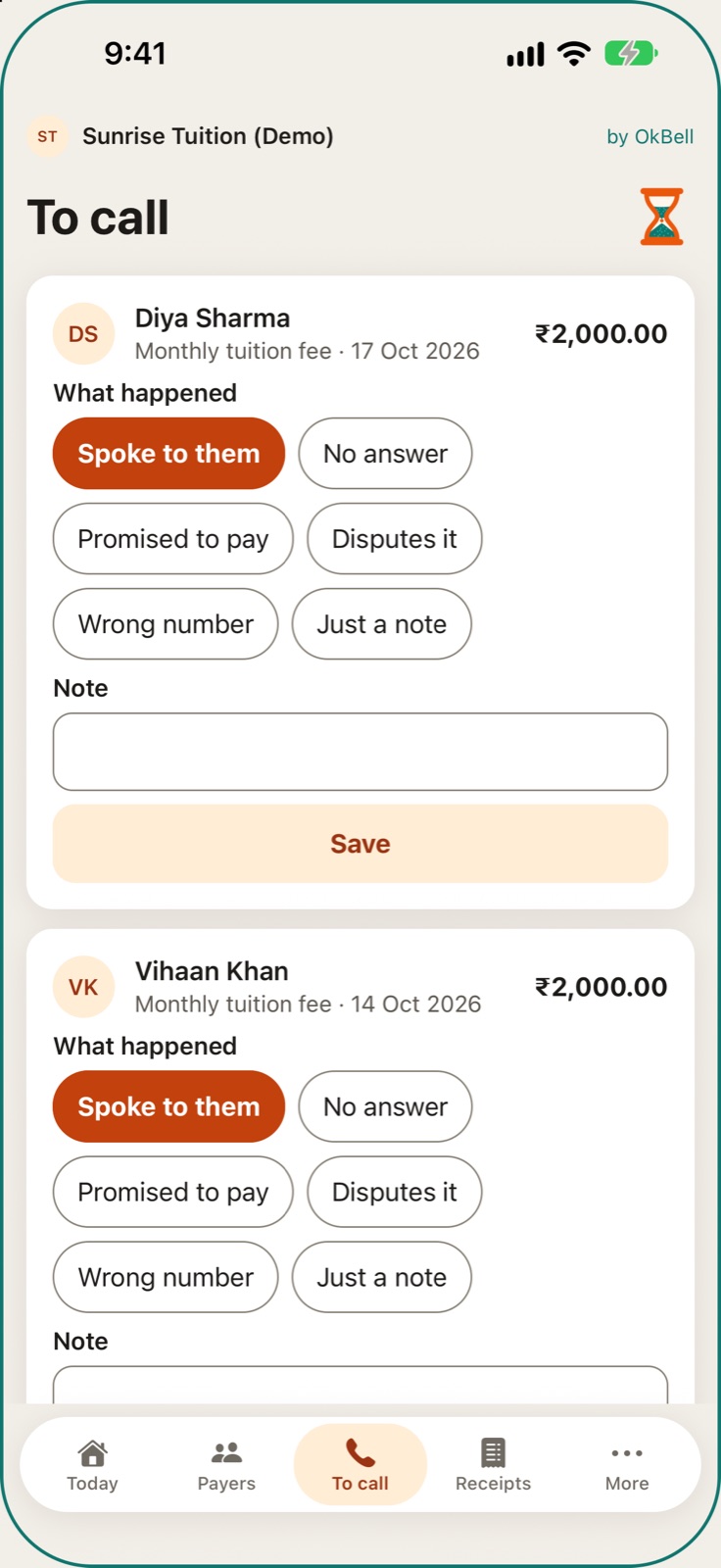
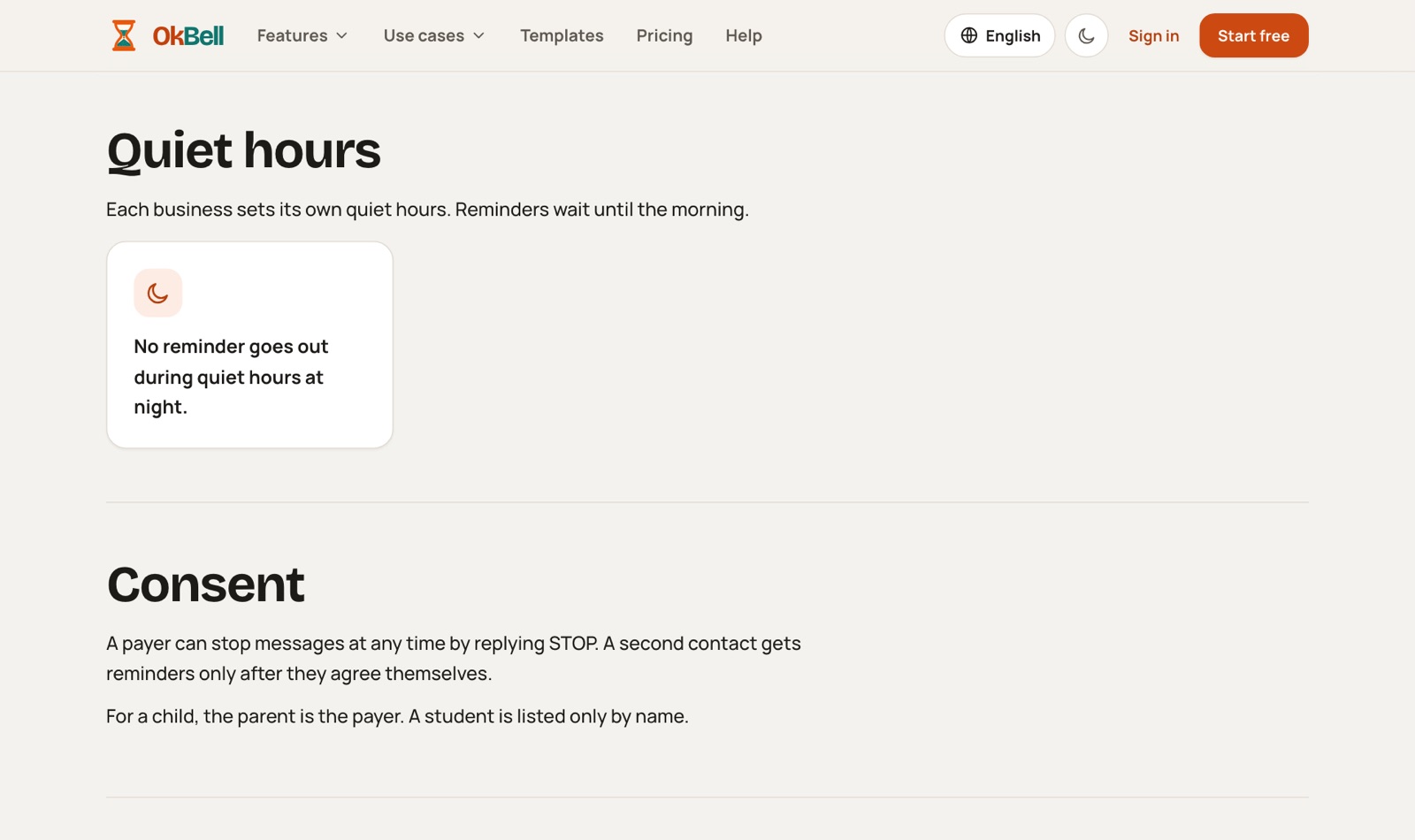
The To call list holds the payers whose reminders have run out, and payers who say they already paid. Call or WhatsApp them from your own phone and record what happened: spoke to them, no answer, promised to pay.
- Know exactly who to call today
- A promise to pay is kept with its date
- On the phone, what you record is saved first and sent when you are online
 Thaja · Newtact
Receipts
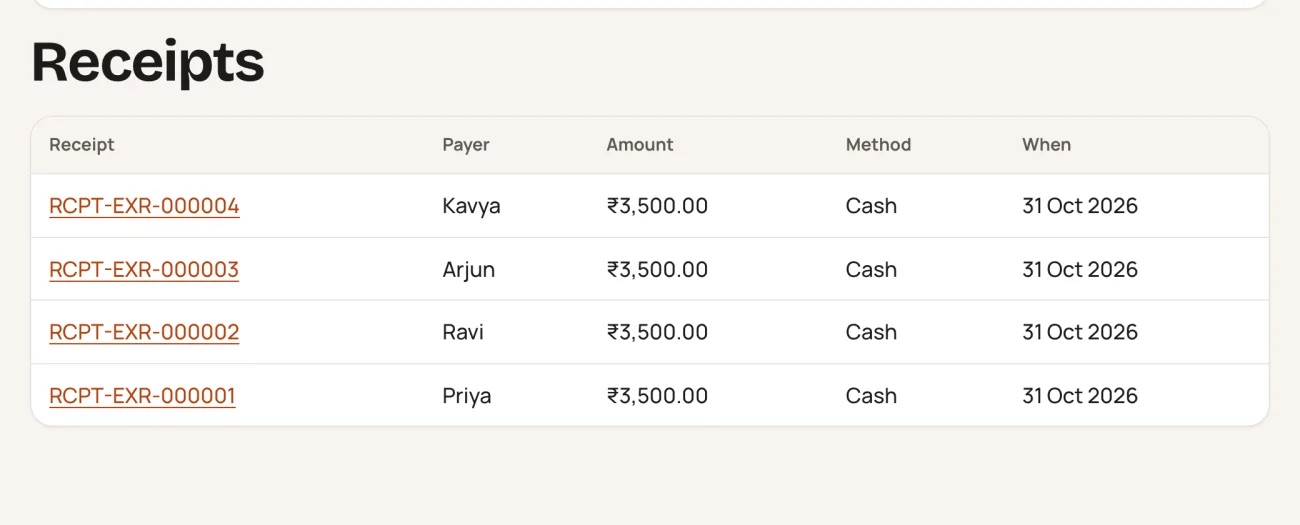
Every payment gets a numbered receipt, cash included. Print it or save it as a PDF on the web, share it from the phone, and the payer gets the same receipt by link.
- A receipt for every payment
- Numbers run per branch
- A cancelled receipt is clearly marked
 Thaja · Newtact
Reports
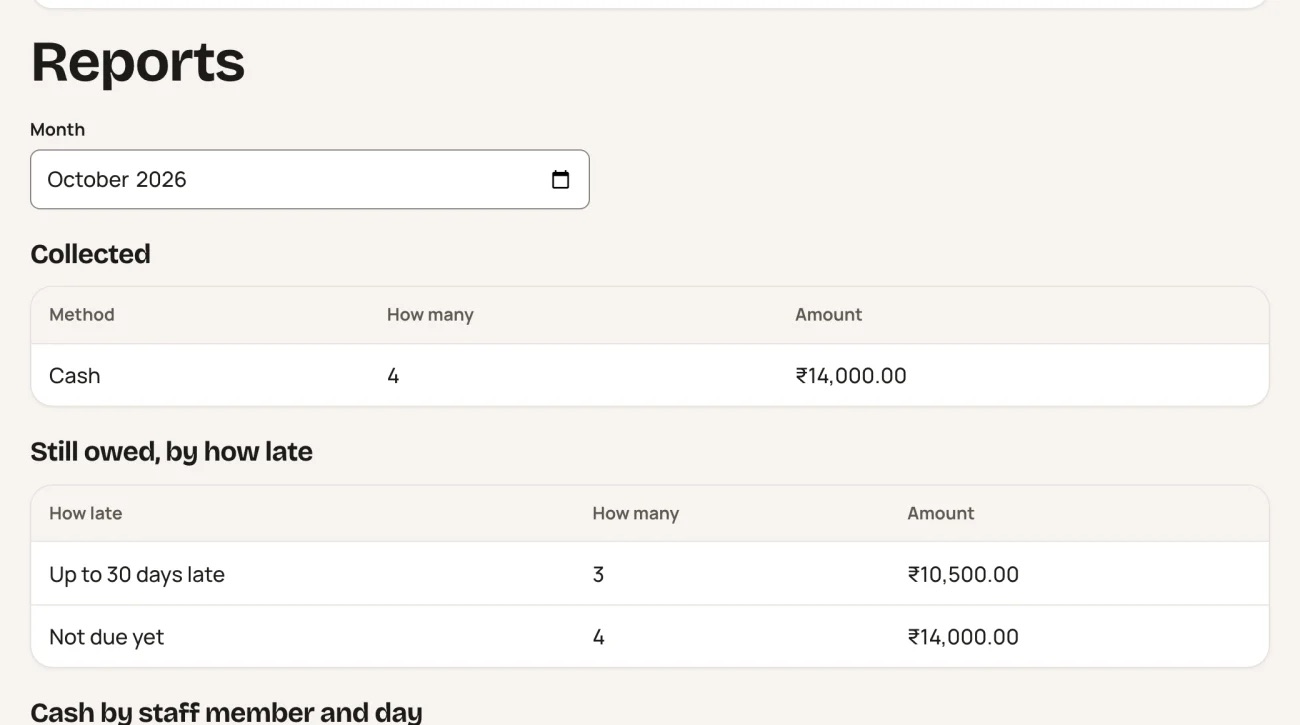
For a branch and a month: what was collected and how it was paid, what is still owed by how late, and the cash each staff member recorded per day. The business's own documents are counted apart from money.
- See the month's collection at a glance
- Check the cash each staff member recorded
- Spot dues that are more than 60 days late
 Thaja · Newtact
Notices and decisions
Send a notice or a yes or no decision to every member, or one group, by each member's own link. Each flat or member answers once, before a deadline you set.
- A clear record of who answered
- Private polls hide who chose what
- Members answer in a browser, with no app
Meetings
Plan a meeting with its date, a place or a video link, the agenda and an optional quorum. Afterwards, attendance, minutes and the decisions taken sit on one page you share by link.
- Agenda, attendance and minutes in one place
- One page to share with members
- You choose whether the shared page lists who attended
Thaja · NewtactYour team and their roles
Invite staff by email with a ready-made role such as admin, branch manager, collector, accountant or guard. Each person works only in the branches you give them.
- Staff see only what their job needs
- Roles decide who records cash and who changes settings
- A business always keeps at least one owner
Reminder times, branches and your data
Set your logo, your reminder times and closed days, and add branches and tax details. You can download every payer and due as a CSV file at any time.
- Reminders only in the hours you choose
- Your logo on your team's screens
- Take your data out whenever you want
Thaja · NewtactConnect your WhatsApp number
Connect your business's own WhatsApp number through Meta's sign-in window. Once Meta approves the message templates, reminders go out from your own number and name.
- Payers see your business's name
- OkBell never sees your Facebook password
- You pay Meta yourself for your own number
Thaja · NewtactReminders that do not stop at one
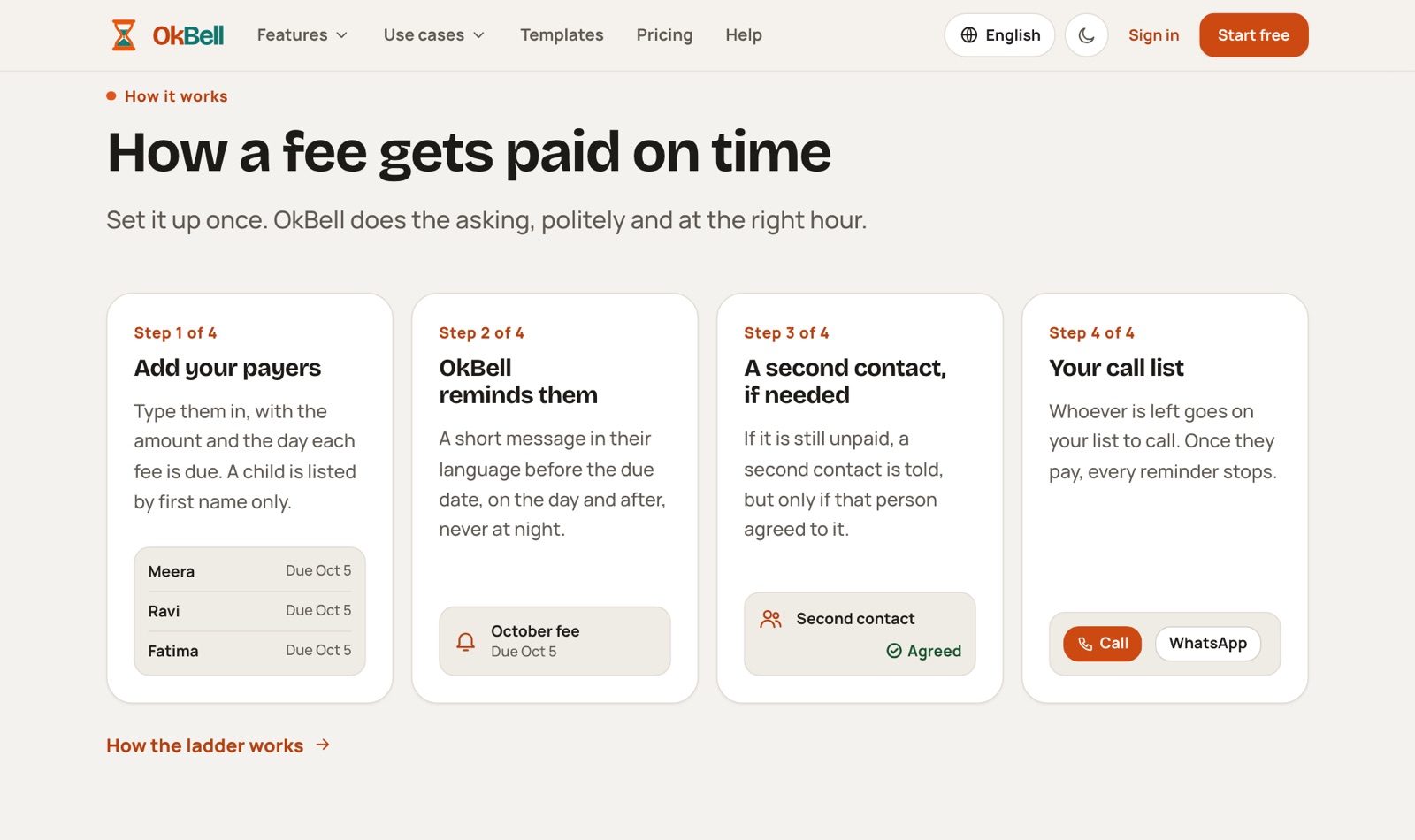
For each due, OkBell reminds the payer before the date, on the day and after it, and can then tell a second contact who agreed. Whoever still has not paid goes on your call list, and a payment stops every reminder.
- You stop chasing people by hand
- Never at night: reminders wait for your sending hours
- Reminders go by email, and by WhatsApp or SMS where it is set up
 Thaja · Newtact
An automated reminder call
As the last step before the call list, OkBell can make one automated reminder call in your business's name. It calls only people who said yes to calls themselves, and only in your country's calling hours.
- One more nudge before you pick up the phone
- Only people who agreed to calls are called
- You choose it branch by branch
Share from your own WhatsApp
Share a bill, the dues, a fund statement or a notice from your own WhatsApp, to a group chat or to each payer with their own link. OkBell sends nothing itself: you press Send.
- Use the group chat your members already read
- Each payer gets their own short link
- Payers who said STOP get no link
Thaja · NewtactFor payers and members
People who pay a class, gym, PG or society use OkBell from the link in a message. They never need an account.
Thaja · NewtactThe pay page
The link in a reminder opens a page with each fee owed, already ticked, and the total. Where the business takes online payments, the payer pays into the business's own account; otherwise the page says to pay the business directly.
- See every fee you owe in one place
- Money goes to the business, never to OkBell
- No account and no app to install
A receipt for every payment
After any payment, cash included, the payer gets a link to a receipt with the business's name, the receipt number, what was paid and how. It can be saved or printed.
- Proof of payment every time
- Says clearly which business issued it
- Shows each fee and the period it covers
Thaja · NewtactClear reminders, and one tap to stop them
A payer gets a clear reminder: who is asking, how much and due when. One reply of STOP, or one tap on the stop link, ends that business's reminders through OkBell; receipts can still reach them.
- One reply or one tap stops it
- "Already paid" on the pay page asks the business to check
- OkBell never asks for a PIN, password or OTP
 Thaja · Newtact
Pass: the gate, visitors and upkeep
Gate passes and approvals by QR code for societies, hostels, offices and sites, and QR stickers for the things you keep running.
Thaja · NewtactVisitor passes at the gate
A member approves a visitor ahead and shares a pass with a QR code and 6 digits. The guard checks it and taps "Let in"; for a walk-in, the flat is asked by a link.
- No calls to the flat for expected guests
- The guard writes no phone numbers, photos or ID numbers
- A list of who is inside now
- A gate QR never asks for money
Vehicle stickers and QR posters
Print numbered QR stickers for vehicles and QR posters for the notice board. A scan never shows the owner's name or phone.
- Spot an unregistered vehicle quickly
- Revoke a lost or copied sticker at once
- An OkBell QR never asks for a payment
Thaja · NewtactVisitors for offices and big sites
For offices, factories and campuses: hosts make passes ahead for a visitor or a group, and answer walk-ins waiting for them. The guard keeps an "Inside now" list by gate and zone, with a roll call for an evacuation or a drill.
- Hosts pre-register their own visitors
- An evacuation list of who is inside
- Never a phone number, photo or ID number
Material passes
Gate passes for goods, returnable or not. A manager approves, the guard counts what goes out and what comes back, and OkBell reminds you of each "back by" date.
- Goods leave only after approval
- Partial returns are counted
- A month's register to download
Thaja · NewtactPasses for workers and daily help
Regular passes for contractor workers and daily help, each with an expiry. Checks such as police verification or a safety induction are kept as dates and reminded before they run out, and the pass shows green or red at the gate.
- The guard sees at once whether a pass is good
- Checks are kept as dates, never as documents
- A contractor's attendance for a month to download
Out-passes for hostels
Day out, night out and home leave for hostel residents and students. For anyone under 18 the parent says yes by a link, the warden approves, and the guard lets them out and back in.
- A minor never goes out without the parent's yes
- A "not back yet" list shows who is late
- Each hostel sets its own rules
Thaja · NewtactUpkeep with QR stickers
Put a QR sticker on a lift, a pump or a generator. Anyone can scan it to see its service history and report a problem without signing in, and service dates are reminded.
- Problems get reported the moment they are seen
- Never miss a service or AMC renewal
- Assign who fixes each problem
Thaja · NewtactPlans
Everyone starts free. Paid plans are sold only on okbell.app, never inside the phone apps.
Thaja · NewtactYour plan in the app
In the phone app, Account shows which plan you have and, when it has one, the date it runs to. It is for reading only.
- See your plan on any device
- A plan you hold works on the web and in the app
Plans and prices on the website
The pricing page shows the plans for your country, tax included, by the month or by the year. Everyone starts on a Free plan, and paid plans are sold only on the website.
- Start free and move up only when you need to
- Shown for your country, with tax inside
- When a plan ends nothing is deleted: you move to Free
Thaja · NewtactWebsite and help
okbell.app explains every part before you sign up and holds the guides people read afterwards.
Thaja · NewtactThe OkBell website
okbell.app explains every part of OkBell before you sign up: Due, Collect, Pass, Nearby, Just in case and Care. Each part has its own page, with use cases for homes and businesses.
- See what OkBell does before signing up
- A page for your kind of home or business
- The site says plainly which parts are open
 Thaja · Newtact
Country due lists on the website
okbell.app/due-packs lists each country that has a checked list of renewal rules, such as a passport or vehicle insurance. Anyone can read them, with no account.
- Look up a renewal rule without an account
- Each rule points to its official page
- Not legal advice: the official page is the authority
Help centre
okbell.app/help has short step-by-step guides, with questions and answers and the full user guides beside it. One address reaches a person for everything: hello@okbell.app.
- Guides for businesses, for personal use and for your account
- The same guide text that OkBell's support team reads
- status.okbell.app shows whether OkBell is working
Thaja · NewtactPlans and prices
Business Free
Free
- Start reminding payers the same day
- Staff roles and the call list work as on paid plans
- Email and app notifications are not counted
One branch
Not on sale yet
- A larger monthly message allowance
- For a business that has outgrown Free
- If it ends nothing is deleted: you move back to Free
Multi-branch
Not on sale yet
- Any number of branches
- The largest monthly message allowance
- If it ends nothing is deleted: you move back to Free
Thaja · NewtactPlans and prices
Personal Free
Free
- No card and no end date
- Reminders for anything due
- Reminders by app notification and email
Personal Plus
Not on sale yet
- Reminders on WhatsApp as well as by notification and email
- The lists of every checked country, not only your own
- If it ends you keep every item and move back to Free
Personal Family
Not on sale yet
- One plan for the whole family space
- Everything in Plus for each adult
- If it ends you keep every item and move back to Free
Thaja · NewtactRecent changes to OkBell
| When | Feature | Commit message | |
|---|---|---|---|
| 20 Nov 2026 | changed | What is due | 5642c1dc |
| 20 Nov 2026 | changed | Add anything with a date | a2c2b1a4 |
| 20 Nov 2026 | changed | All my items | a2c2b1a4 |
| 19 Nov 2026 | changed | Start a business | 2735744d |
| 19 Nov 2026 | changed | Business Free | 2735744d |
| 19 Nov 2026 | changed | Material passes | 5c121021 |
| 19 Nov 2026 | changed | Bring dates in from your calendar | 5c121021 |
| 19 Nov 2026 | changed | A family space | 5c121021 |
| 19 Nov 2026 | changed | Lists and checklists | 5c121021 |
Thaja · NewtactRecent changes to OkBell
| When | Feature | Commit message | |
|---|---|---|---|
| 19 Nov 2026 | changed | Remind someone else | 5c121021 |
| 19 Nov 2026 | changed | Sign in with an email code | 5c121021 |
| 19 Nov 2026 | changed | Your account, language and theme | 394b7c5e |
| 19 Nov 2026 | changed | Reports | 7e43ede0 |
| 19 Nov 2026 | changed | Calendar feed | 3950ecc4 |
| 18 Nov 2026 | changed | Personal Free | 591c83ef |
| 18 Nov 2026 | changed | The pay page | 48f937a1 |
| 18 Nov 2026 | changed | Multi-branch | 48f937a1 |
| 18 Nov 2026 | changed | One branch | 48f937a1 |
Thaja · NewtactTry it, and tell someone.
 Thaja · Newtact